What to Do When Your Tesla Faces Issues: A Troubleshooting Guide
F1 NewsThursday, 13 March 2025 at 03:44
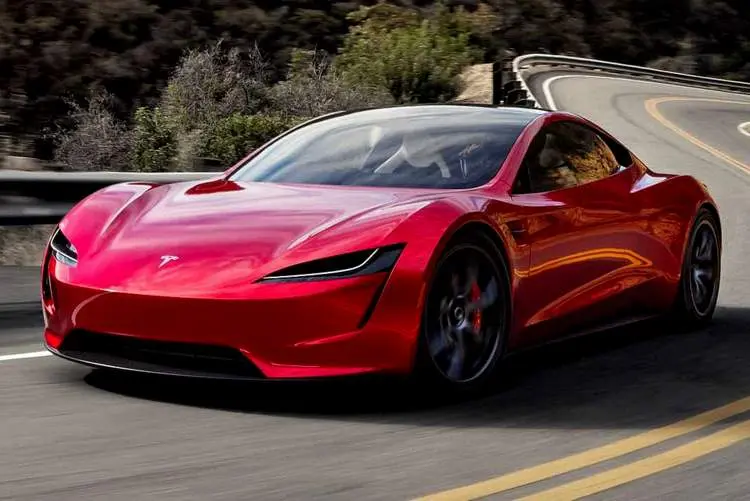
Tesla vehicles are known for their cutting-edge technology and impressive performance. However, even the most advanced cars can sometimes face issues, which can be frustrating, especially when they won’t start.
Understanding why a car fails to start and how to troubleshoot these problems is essential. Electric vehicles, like Teslas, have their own unique set of challenges. Unlike traditional vehicles, problems with your electric car may stem from issues like battery health, charging, or software glitches.
For our Formula 1 readers and F1 fans who are Tesla owners, here's a step-by-step approach to diagnosing and fixing your Tesla when it faces trouble starting:
Tesla Battery Health and Charging Issues
One of the most common reasons why a car won’t start in electric vehicles is a dead or damaged battery. The battery in your Tesla powers all essential systems, and if it’s low or faulty, it can lead to starting problems.
Tesla’s lithium-ion batteries generally have a long life, but like any battery, they eventually degrade. If your battery isn’t holding a charge, it may prevent the car from starting properly.
Another potential issue may be related to charging. Tesla vehicles rely on the charging port and cable to receive power. If there's an issue with either the charging equipment or the charging station, your car might not have enough power to start. Sometimes, the connection may not be properly made, or the charging cable itself could be damaged.
If you encounter this issue, it’s essential to first check that your charging station is working correctly. Services like roadside assistance or professional towing may be required if the issue is with your car’s internal charging systems.
Some common reasons why a car won’t start could include faulty batteries, inadequate charge, or issues with the power supply. Always check for signs of damage to your cables or connectors, and make sure they are properly inserted into the charging port.
Inspect the 12V Battery

In addition to the main lithium-ion battery, Tesla also has a smaller 12V battery that powers the essential systems. This battery operates key functions such as lighting, wipers, and safety systems.
If the 12V battery is drained or faulty, your vehicle may not start. Unlike the larger battery, which powers the drivetrain, the 12V battery can often be overlooked when diagnosing issues.
If you notice that your car’s lights aren’t working or certain electronics aren’t functioning, the 12V battery might be to blame. To fix this issue, you may need to replace the 12V battery. Fortunately, Tesla offers easy replacement for this part, and a professional technician can quickly diagnose the problem if it’s not immediately apparent.
Tesla Screen and Software Reset
A frozen or malfunctioning touchscreen can sometimes cause your car to appear as if it's not starting. Tesla relies heavily on its software to control numerous vehicle functions, from navigation to climate control.
If the screen freezes or doesn’t boot up correctly, you may think the vehicle itself has a problem. However, in many cases, it’s just a software glitch that can be fixed with a simple reset.
To reset the system, hold down both scroll wheels on the steering wheel for about 10 seconds until the screen goes black and reboots. After the reboot, the vehicle may be responsive again. If this doesn’t work, there may be an underlying software issue that could require a visit to a service center or an over-the-air software update.
Check for Over-the-Air Updates

Tesla frequently rolls out over-the-air updates that improve the vehicle’s performance, fix bugs, and add new features. These updates often include important fixes for various car systems, and sometimes, your car may not start if an update hasn’t been completed. Incomplete or delayed updates can cause temporary issues when starting the vehicle.
To check if updates are pending, open the car’s settings menu and look for the "Software" section. If there’s an update available, follow the instructions to install it. If your car won’t start and no updates are pending, the issue might lie elsewhere, and additional troubleshooting may be necessary.
Verify Charging Equipment
Sometimes, the issue preventing your Tesla from starting may not be the car itself but the charging equipment you're using. If the charging cable, adapter, or station isn't working properly, the car may not receive enough power to start. Verify that your charging station is functioning and that the cable is securely connected to both the station and the car.
A loose connection could prevent the car from receiving the necessary charge, leading to starting issues. If you suspect that the charging station is faulty, try using another charger or station to see if the problem persists.
If you're using a home charging station, check for any signs of damage to the charger, including exposed wires or worn-out connectors. These issues can often cause charging interruptions, leading to insufficient power to start your car. If everything looks fine but the problem continues, you may need to contact a professional or a Tesla service provider for assistance.
Tesla’s Mobile App: Troubleshooting Tool

Tesla's mobile app is an invaluable tool for troubleshooting. It offers features that can help you identify why your car might not be starting. Through the app, you can check your vehicle’s battery status, software updates, and more.
If the app is unable to connect to your car or isn't providing enough information, it could be a sign of a communication issue between the app and the vehicle’s system.
If you're unable to get the app to work properly, try restarting your phone or reinstalling the app. Sometimes, connectivity issues may be related to network problems or app glitches. If the app is still unresponsive, consider reaching out to Tesla’s customer service team for further support.
When your Tesla won’t start, it can feel overwhelming, but taking a systematic approach to troubleshooting can help you identify the problem. From checking the basics, like the battery and software, to reaching out for professional help, there are many steps you can take to get your vehicle back on the road.
Always start by verifying simple things such as the battery charge and the condition of the charging equipment. If those checks don’t work, don’t hesitate to seek professional assistance.
With a little patience and the right knowledge, most starting issues can be resolved quickly, allowing you to continue enjoying your Tesla with peace of mind.
Latest News









Loading